
Judgement - A Telegram bot for playing card games
My journey of developing and hosting telegram bots for playing card games

Recently I developed a Telegram bot called Judgement Card Game. It’s a bot that can be used in a telegram group to play the famous card game Judgement. In this post, I am describing my journey into this new hobby project.
Many of the stuff I describe here may be obvious for web developers, but it was new for an embedded developer like me.
You can play the Judgement card game by:
using the web link https://t.me/Judgement_gamebot on browser
Searching for Judgement_gamebot in telegram app

How did it start?
When I newly joined Telegram, I was fascinated by its features. Soon I discovered the bots that can do various things. Especially the UNO bot which can be used to play the famous card game UNO in a telegram group. I took this idea and started thinking about other card games that can be neatly played in the telegram group. And thus my hobby project on creating Judgement Card Game started.
First step - custom sticker set
Telegram allows users to upload their own sticker set. The sticker can be any image. I created a custom sticker set by uploading an image for each card in the deck.
I did some googling and downloaded the assets from the American Contract Bridge League website. I had to post-process the images for creating stickers. That was easily done with a simple script using FFmpeg and GIMP. The result was a nice custom sticker set that is now published at https://t.me/addstickers/PlayingCardsDeck

Creating a bot in telegram
Before I jumped to coding the functionality, I had to create a telegram bot and get some tokens. Telegram has a bot for creating bots. It’s called BotFather. The process was very simple. I answered few questions regarding my new bot to the BotFather and it generated a new bot for me. The important bit was to get the token that will be required for implementing the bot.

There are many ways to implement the bot functionality, e.g. Python, nodejs, etc. I went with the nodejs since I felt it was easier to handle the JSON objects in nodejs compared to Python. The documentation for the official Telegram Bot API and nodejs package was helpful to get started with simple prototypes. Within an hour, I was able to communicate with the bot and verify responses from it.
Once my bot was set up, I spent two weekends trying to understand different bot APIs which will be useful for creating the game. Following are the most notable APIs.
Sending a message
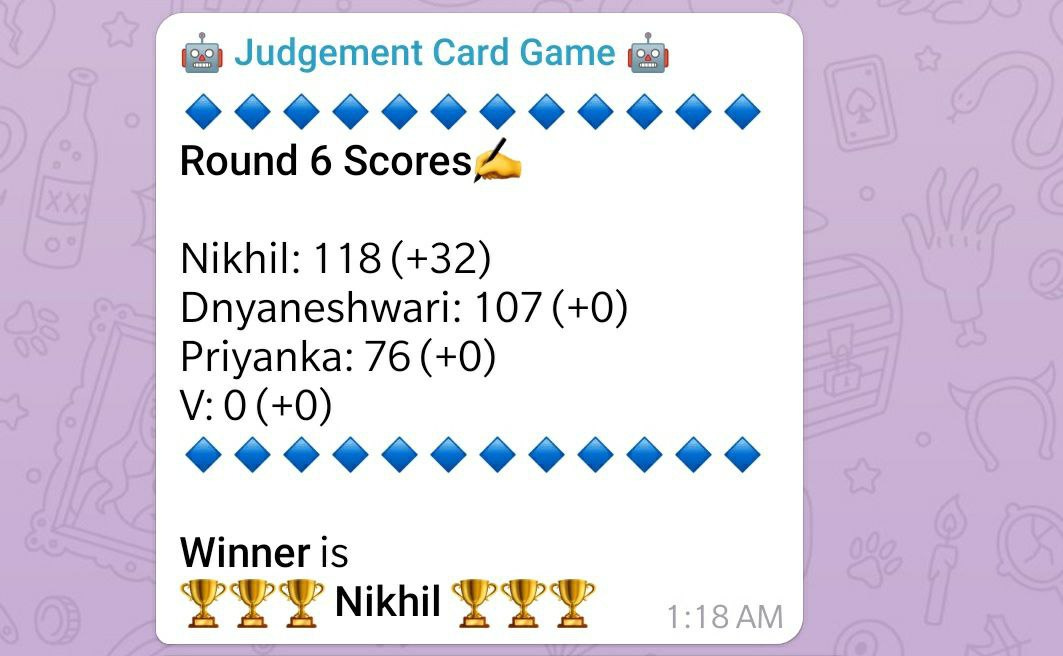
`bot.sendMessage` is used to send a text message to some chat. It can be group chat or personal chat. There is an HTML parser that enables using bold/italics in the text. Also, telegram supports Unicode, so embedding emojis in the text helped decorate the text responses. Here is how the bot declares the winner after the game is over.
Attaching buttons to messages
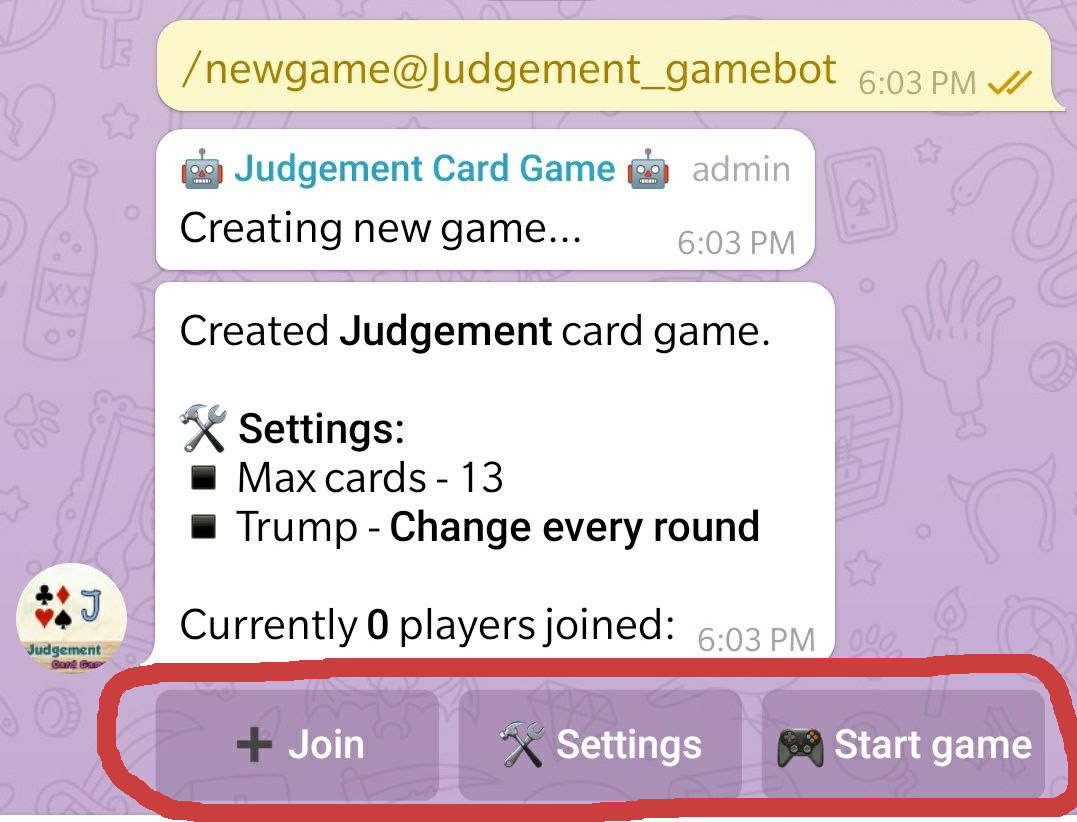
Bots can send messages with custom buttons attached to the message. This is the best feature of the telegram which enhances the user interaction with the bots. When a user sends a request to start a new game, the bot responds with a message with 3 buttons attached to it. When a user clicks on any button, the bot gets a callback in the backend. Here is how the attached buttons look like:
Inline queries
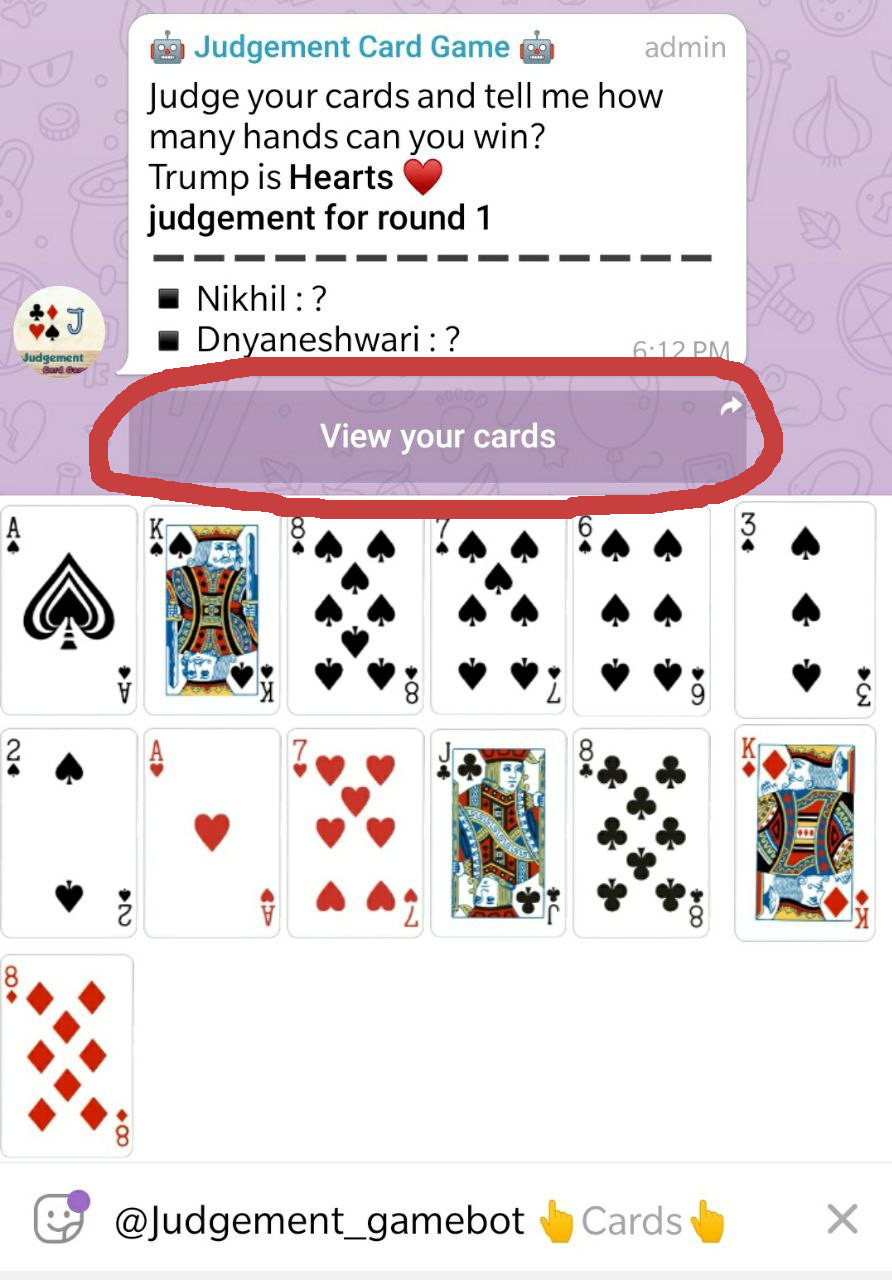
Inline queries are special buttons, which request the bot for some information. The bot can return different items as a response. It can be text, images, links, audio, article, or stickers. This is exactly what I wanted. When a player wants to see his cards, he clicks on the button and my bot responds with a set of stickers showing the cards currently with the player. Here is how the bot responds when a player clicks on View your cards button:
Gameplay logic
I was able to code the basic gameplay logic in Javascript. Thanks to my friends and cousins for helping me with the beta testing of the game and also for cheating their way to victory.
Players were looking at the previous messages in the chat history to know what cards were played before. I fixed this by deleting the old messages after every hand was over. Of course, this required the bot to be an admin in the group.
From beta testing public demand, I added few more features. At this stage, I was pretty much ready with a fully-featured bot hosting Judgement games from my PC.
You can find the code for this bot hosted at https://github.com/nikhildevshatwar/cardgame_tg_bots. Leave a Github star if you like it.
Hosting on Heroku

To host this bot on a public server, I used Heroku worker dynos. With a little bit of googling, I was able to set up the server and started running the bot from the Heroku server. At this point, I also set up automatic deployment of the project from GitHub. So whenever I pushed the code to the git repo, my bot would automatically be restarted with the latest code.
I also created a test bot with a different token for testing locally. This fixed many timeout issues that may occur when reusing the bot token from multiple places. Heroku environment variables allowed me to pass a token for the production bot and I used a token for the test bot for local testing.
Telegraph articles
Telegram uses telegra.ph for quick and easy documentation. I liked this and I created a simple page to describe the bot’s usage and rules of the game. Telegram’s instant view feature makes it very easy to view the articles on a phone. Here is the help article I wrote for this bot:
Result?
After spending two months, I have a stable bot with decent functionality. The whole experience has been rewarding. I got to learn a lot of new things like GIMP, Telegram bot API, Heroku hosting, and many more. One more thing I also learned is that though I am good at developing the bot, when it came to playing the game, I was not so good at it!
References
Github project https://github.com/nikhildevshatwar/cardgame_tg_bots
Telegram bot https://t.me/Judgement_gamebot
How to play the game https://telegra.ph/Judgement-Card-Game-05-30
What’s next?
After the success of the Judgement card game, I am also working on Kaaliteeri. This is a very involved and fun card game that I learned in college. I have a working prototype already, stay tuned for more updates on this one.
I would really appreciate if you subscribe to the newsletter. You’ll receive an email twice a month with new articles from my newsletter.
Telegram API has a way to send query and query response allows to preview the stickers being sent
It's the same way when you preview stickers before sending them
Hey how do U make the cards appear as list with show your cards button,, i am just able to send them as mesaage when I send them via my code,, can u show the code or explain please